

← Digital Products Meal & grocery planning · Google Sheets

The Meal Planner

Choose the week's dinners and let the workbook turn them into a shopping list, while keeping recipes, items already at home and the grocery budget connected.

7-dinner weekly planner50 dinner + 6 baking recipesAutomatic shopping listPrice BookStore-price comparisonsMeal history + on-hand items
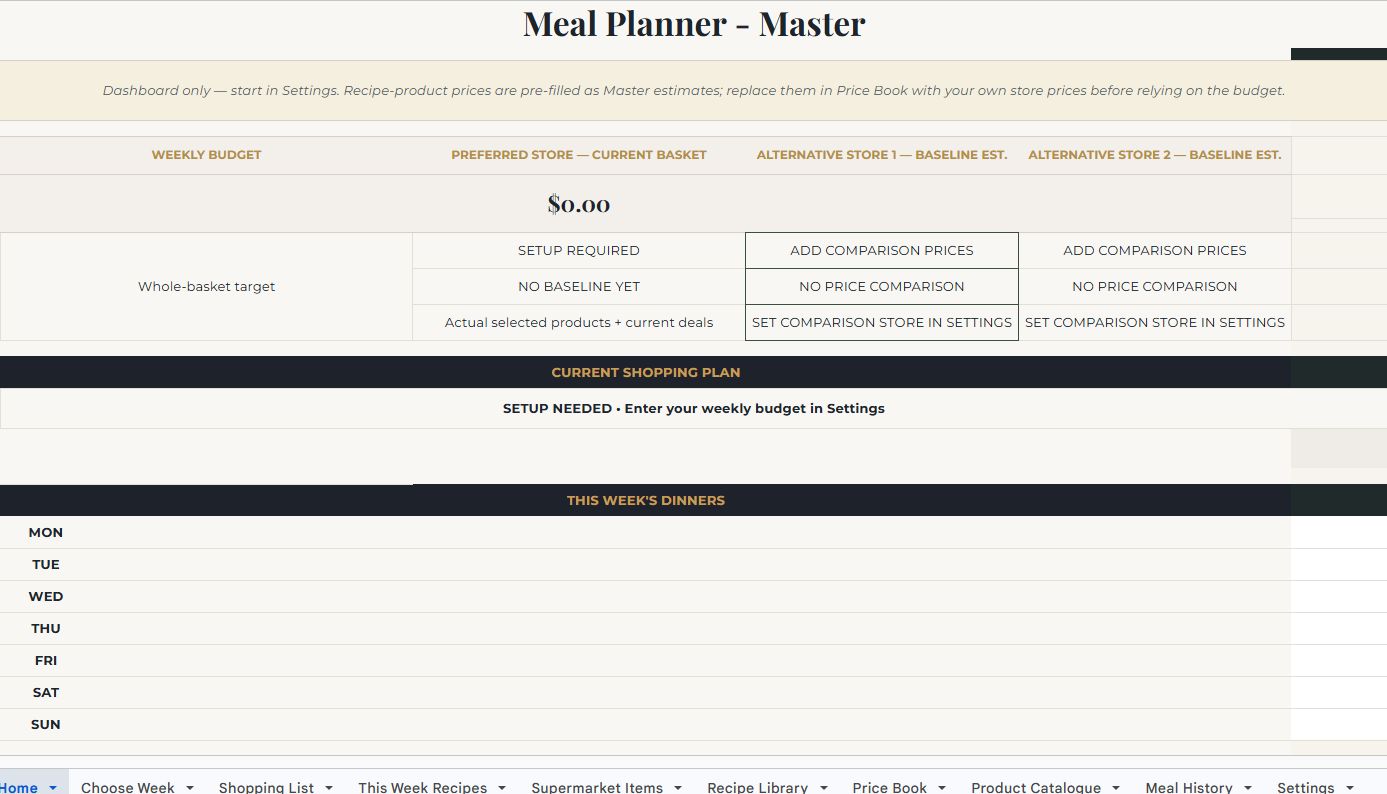
The Meal Planner dashboard preview
Actual dashboard screenshot. View full size
How to use it

See how the pieces connect
before you start.

Set up the household and preferred store, replace the starter prices with real local prices, then choose seven dinners. The shopping and recipe pages build themselves around that week.

It currently includes 50 dinners and 6 baking recipes. It can plan seven dinners, add up to two baking choices and compare stores when real local prices have been entered.

Workbook guide

What every tab actually does.

11 customer-facing tabs explained from the working master, not a mock-up.

01
Workbook tab

Start Here

What it is for

The orientation page and quickest explanation of the intended workflow.

What you do here

Follow the four-step route: set household/store basics, check prices, choose the week, then shop and keep the planner current. It also explains how to add custom dinner or baking recipes and which cells are intended for editing.

What happens automatically

Nothing needs to be calculated here. It acts as the workbook guide and explains that custom recipes also need ingredient mapping before Shopping List can calculate what to buy.

02
Workbook tab

Home

What it is for

The read-only weekly dashboard for budget position, store comparison, dinners and the current shopping plan.

What you do here

Use it to see the weekly budget, preferred-store basket, optional alternative-store estimates, budget status, the seven selected dinners and a compact shopping-list view.

What happens automatically

It updates from Settings, Choose Week, Shopping List and Price Book. Store comparisons remain deliberately blank or marked as setup-required until enough local pricing information exists.

03
Workbook tab

Choose Week

What it is for

The seven-dinner selector and rotation view.

What you do here

Choose the mode, select a week type such as Best Value, and either accept system suggestions or choose each dinner yourself for Monday through Sunday.

What happens automatically

Selected meals feed Shopping List and This Week Recipes. Estimated ingredient use, last-eaten information and rotation notes become more meaningful as Price Book and Meal History are maintained.

04
Workbook tab

Shopping List

What it is for

The main working list for the supermarket trip, including quantities, product choices, budget totals and optional comparison-store information.

What you do here

Review the automatically required dinner items, choose products where alternatives exist and use Adjust Qty only when the calculated pack count needs a manual override. The lower baking controls can add Bake 1 and Bake 2 to the week.

What happens automatically

Dinner quantities come from the selected recipes, Need? reacts to calculated requirement and On Hand, totals compare against the weekly budget, and comparison-store savings/coverage update only when verified alternative prices are supplied.

05
Workbook tab

This Week Recipes

What it is for

A read-only recipe-card view for the current week.

What you do here

Open it while cooking to see the seven selected dinners and any chosen baking recipes, with fresh ingredients, pantry/staples and step-by-step instructions.

What happens automatically

Dinner cards update from Choose Week. Bake 1 and Bake 2 update from Shopping List, so you do not need to copy recipes manually into this page.

06
Workbook tab

Supermarket Items

What it is for

The household item layer that tracks what the plan needs versus what is already on hand.

What you do here

Most fields are system-driven. Enter On Hand when useful so the planner knows you already have an item; review the preferred product, normal quantity, unit and notes when maintaining the catalogue.

What happens automatically

Item/product information flows from Price Book while dinner and baking requirements calculate planned quantities. The Shopping List can then avoid buying items already available at home.

07
Workbook tab

Recipe Library

What it is for

The full dinner and baking catalogue, including favourites, timing, history and cost context.

What you do here

Browse the included 50 dinners and 6 baking recipes, set Favourite = Yes for meals you want favoured more often, and use the reserved blank recipe IDs when adding your own recipes.

What happens automatically

Meal History feeds last-eaten and times-eaten values. Estimated ingredient use and cost band use the ingredient/price setup, while custom recipe shopping quantities require the matching Recipe ID to be mapped to ingredients.

08
Workbook tab

Price Book

What it is for

The source of grocery product, pack-size and price information used by the budget calculations.

What you do here

Replace the starter primary-store estimates with your own checked local prices before relying on totals. Add loyalty/member pricing and comparison-store products/prices only when you want those comparisons; leave unknown prices blank rather than guessing.

What happens automatically

The planner chooses the usable primary price, converts pack pricing into meal/shopping cost estimates and feeds Home and Shopping List. Comparison coverage and savings appear only when enough alternative-store data is present.

09
Workbook tab

Product Catalogue

What it is for

An extension catalogue for extra brands or pack choices beyond the core Price Book product.

What you do here

Add category, requirement, retailer, brand, product/pack, pack size, unit, pricing method, regular/sale price, deal type, source URL and set Active? = Yes when the option should be available.

What happens automatically

Active catalogue products can become selectable choices in Shopping List. Variable per-kilogram items and fixed pack/bottle items are handled differently using the pricing and pack-size fields.

10
Workbook tab

Meal History

What it is for

The feedback and rotation memory for meals you have actually cooked.

What you do here

After a meal, log the date, meal, rating, Favourite?, Have again? and any notes.

What happens automatically

Those records update last-eaten and times-eaten in Recipe Library and give the weekly chooser better information for rotation and preference handling.

11
Workbook tab

Settings

What it is for

The household and supermarket setup page that should be completed before relying on the dashboard totals.

What you do here

Enter country/region, weekly budget, household-size reference, primary supermarket, saving threshold, home area, up to two comparison supermarkets and whether loyalty/member pricing is used. Optional product preferences can lock in exact household choices.

What happens automatically

Settings supply regional/currency guidance, budget targets and store labels throughout the workbook. Household size is reference-only: the included recipes are currently written for four people and do not auto-scale.

Back to the collection

Compare the other
Sorelium planners.

View all digital products