

← Digital Products Wedding planning · Google Sheets

The Wedding Planner

A wedding planner that keeps the guest list, budget, vendors, tasks, wedding-day plan and backups connected without pretending every decision has already been made.

Today priority dashboardGuests & RSVPsBudget & paymentsVendors & decisionsTasks & timelineWedding Day + Plan B
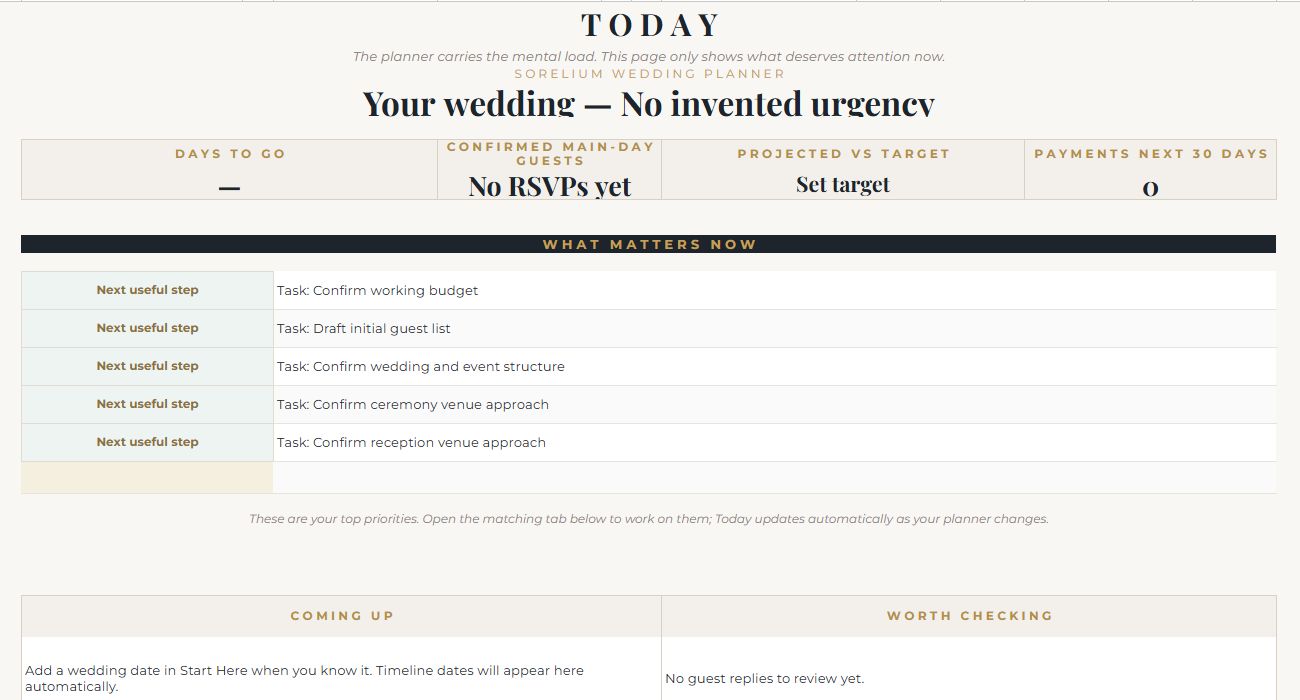
The Wedding Planner dashboard preview
Actual dashboard screenshot. View full size
How to use it

See how the pieces connect
before you start.

Begin with whatever is known on Start Here. The rest can be filled in as decisions become real. Today stays read-only and brings the most useful next actions into one place.

I built it to lower the mental load, not add another complicated system to the wedding. The Today page brings forward what needs attention while the plan is still taking shape.

Workbook guide

What every tab actually does.

8 customer-facing tabs explained from the working master, not a mock-up.

01
Workbook tab

0 | Start Here

What it is for

The setup page for the whole wedding. It is deliberately designed so you can begin even when the date, venues or format are still undecided.

What you do here

Enter the wedding date when known, ceremony and reception locations, whether they are in the same place, estimated guest count, target spend, optional family contributions, planning stage, wedding type, areas to watch, couple names, currency, date format, optional venue capacity and any extra events.

What happens automatically

These choices feed the rest of the planner. Once a wedding date exists, countdowns and suggested timeline dates can populate; guest-count choices feed cost planning; optional extra-event names become available in RSVP and planning areas.

02
Workbook tab

01 | Today

What it is for

The main read-only dashboard. It is meant to answer: what deserves attention now?

What you do here

Normally, you do not edit this page. Use it to check days to go, confirmed main-day guests, projected spend versus target, payments due in the next 30 days, the top current priorities, upcoming items and things worth checking.

What happens automatically

Today updates from the other planning tabs. Task deadlines, RSVP progress, open vendor decisions, budget information and the wedding date are brought together so you do not have to search through the workbook for the next useful step.

03
Workbook tab

02 | Guests & RSVPs

What it is for

The master guest list and RSVP tracker. One person gets one row, including plus-ones, so headcounts remain explicit.

What you do here

Record household/group, guest name, invite status, main wedding-day RSVP, optional extra-event RSVPs, age group, plus-one relationship, meal choice, dietary needs, access/support notes, table assignment and general notes.

What happens automatically

The summary counts invited/on-list, confirmed, waiting and declined guests. An RSVP cutoff can appear once a wedding date exists, and guest/catering information can feed the Wedding Day view.

04
Workbook tab

03 | Budget & Payments

What it is for

The cost plan and payment control area. It lets an early estimate gradually become a quote and then an actual amount without losing the planning history.

What you do here

For each category or service, enter the vendor/service, charging method, estimate, quote, actual cost, quantity or guest count where relevant, event and notes. Use the payment schedule lower in the sheet to track what has been or still needs to be paid.

What happens automatically

The planner uses the most certain available amount to build projected spend, tracks paid-to-date and outstanding amounts, and can test a different guest count. Chosen vendor quotes can flow into matching budget items when they are recorded in Vendors & Decisions.

05
Workbook tab

04 | Vendors & Decisions

What it is for

A comparison and decision log for suppliers and services, without assuming every wedding needs every starter row.

What you do here

Set a decision status, compare up to three options and quotes, then record the selected supplier, selected quote, contact details, email/phone, contract or link, event and notes. Mark irrelevant services as Not needed.

What happens automatically

Open, chosen/booked, still-comparing and not-needed counts update at the top. When a selected supplier and quote match a budget service, the selected quote can update the matching Budget item instead of making you enter the same number twice.

06
Workbook tab

05 | Tasks & Timeline

What it is for

The working task list and date-driven planning timeline. The starter tasks are prompts, not rules.

What you do here

For each task, use the suggested date as a guide or add your own real due date, then assign an owner/role, status, event, blocker/waiting-on item and notes. Mark tasks you do not need as Not needed.

What happens automatically

Suggested due dates move with the wedding date. Your own due date takes priority when supplied, and Today uses the task dates and statuses to surface work that needs attention or is coming up.

07
Workbook tab

06 | Wedding Day

What it is for

The practical run-of-day page for the ceremony, transitions, reception and guest needs.

What you do here

Add a couple photo if wanted, then build the real schedule using time, event/item, location/venue, people or vendors/contact and notes. Use the ceremony, transition and reception areas to describe how the day actually moves.

What happens automatically

The wedding date and known locations can carry through from Start Here. Catering supplier information and guest catering/dietary needs can appear as vendor selections and RSVPs are completed.

08
Workbook tab

07 | Plan B

What it is for

A calm contingency page for the weather, supplier or logistics issues that genuinely need a backup.

What you do here

For each risk worth planning for, record what needs a backup, the current plan, the alternative, the trigger for using it, current status and contact/notes.

What happens automatically

This tab is intentionally simple rather than prediction-driven. It keeps the agreed fallback visible so the wedding-day plan does not depend on remembering it under pressure.

Back to the collection

Compare the other
Sorelium planners.

View all digital products